

Summary
In Dynamics 365 Business Central, managing accounting periods and inventory periods is crucial for ensuring accurate financial reporting and maintaining inventory data integrity. These periods work independently but complement each other, helping businesses maintain control, streamline operations, and ensure compliance.
Accounting Periods
Accounting periods are defined spans of time during which an organization assesses its financial performance by preparing reports like income statements or balance sheets. In other words, the organization can break down the fiscal year into smaller periods (e.g., monthly, weekly, 4-4-5 structure). Accounting periods are necessary in Business Central if you need to close an income statement or perform data compression tasks or run Budget Reports by Periods
Creating Accounting Periods in Dynamics 365 Business Central:
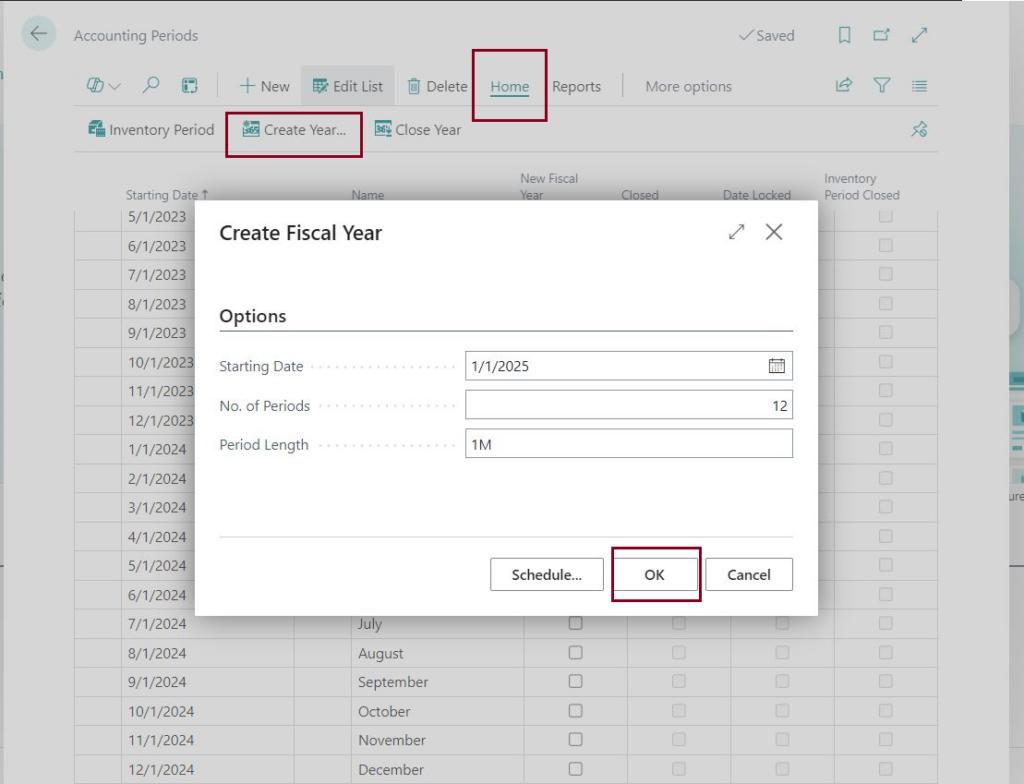

4-4-5 Calendar
Commonly used by businesses, especially in retail and manufacturing
Example:
| Period | Start Date | End Date | Weeks |
| Period 1 | Jan 1, 2025 | Jan 28, 2025 | 4 weeks |
| Period 2 | Jan 29, 2025 | Feb 25, 2025 | 4 weeks |
| Period 3 | Feb 26, 2025 | Apr 1, 2025 | 5 weeks |
| Q1 Total | Jan 1, 2025 | Apr 1, 2025 | 13 weeks |
How to Set Up a 4-4-5 Calendar in Dynamics 365 Business Central:
1-Create a New Fiscal Year using Create Year functionality
2-After the fiscal year is created, you can edit the lengths of the months to align with the 4-4-5 structure
FAQs
- Can I modify an accounting period after it’s created?
Yes, you can modify an accounting period if it is not closed yet or if the period is not the starting date of a new fiscal year that follows a closed year.
So, if the field Date Locked field is marked as false you can still make changes to that accounting period.
- Can I reopen a closed fiscal year?
No, you cannot reopen a closed fiscal year.
- How do I handle adjustments for a closed period?
Even after a fiscal year is closed, you can still post general ledger entries to it. These entries will be labeled as “posted to a closed fiscal year,” and the Prior Year Entry checkbox will be selected. Ensure that you close the income statement again after posting to closed accounting periods in Business Central.
Inventory Periods
Inventory periods specify a timeframe during which inventory changes can be posted. Closing an inventory period prevents any inventory changes from being posted with a date prior to the period’s end.
You can create Inventory Periods in Business Central by clicking Edit List and then add the Ending Dates manually for each period.
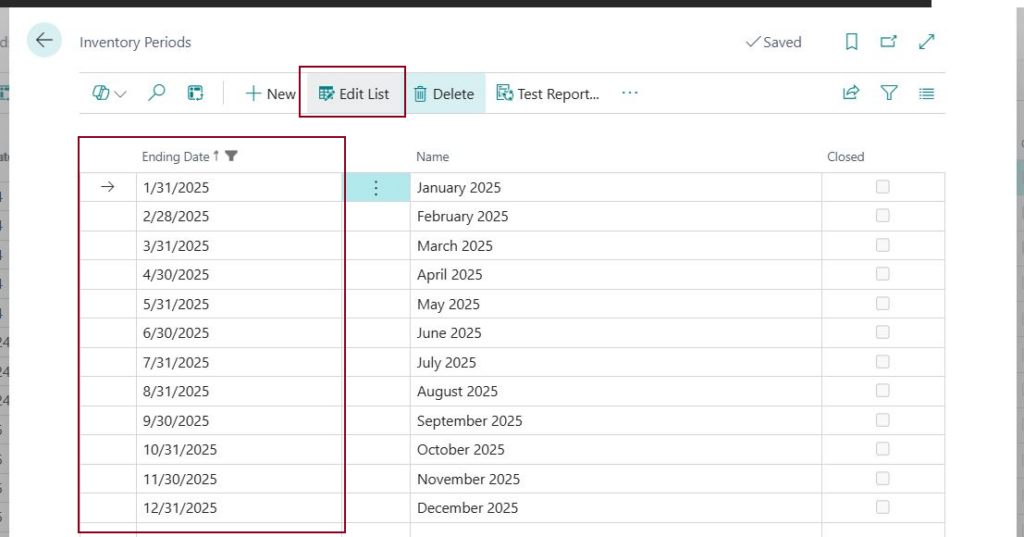
FAQs
- Can I reopen a closed Inventory Period?
Yes, you can reopen a closed Inventory Period.
2. What happens if I run the Item Cost Adjustments for a closed inventory period?
If there are any adjustments to be posted, Business Central will post these adjustments for the next period that is still open.
3. How do I handle inventory adjustments for a closed period?
If you want to post to inventory adjustments to that period, you need to reopen the Inventory Period first
4. Can I use Inventory Periods without setting up Accounting Periods?
Yes, you can create Inventory Periods without setting up Accounting Periods. Business Central handles these independently.
5. Are inventory periods mandatory in Business Central?
No, inventory periods are not mandatory in Business Central. You can still post inventory transactions without having inventory periods setup.
6. What should I do before closing an inventory period?
Ensure all necessary inventory adjustments, receipts, shipments, and invoicing are posted.
Reconcile inventory accounts with financial records.
Review reports for errors or discrepancies.
7. Can I close multiple inventory periods at once?
Yes, you can close multiple inventory periods at once.
Make sure to select all the periods you must close and the little arrow on the left is pointing the last period.
Sources: